
Author Cutter-Sanborn Generator
A free cataloging and learning platform for generating Cutter-Sanborn author numbers, building call numbers, printing spine labels, and reviewing practical library science topics.
Supporting Library Cataloging Workflows
The Author Cutter-Sanborn Generator supports librarians, catalogers, library staff, and library science students. It began as a focused tool for generating Cutter-Sanborn author numbers and has grown into a practical workspace for constructing DDC and LC call numbers, preparing spine labels, and strengthening cataloging knowledge.
Its tools reduce repetitive lookup and formatting work, promote consistency, and help users prepare individual or bulk call-number labels during bibliographic and technical processing.
The Review Hub extends that purpose with LLE coverage, subject-based exam challenges, cataloging articles, FAQs, and practical guides that open directly on the page.
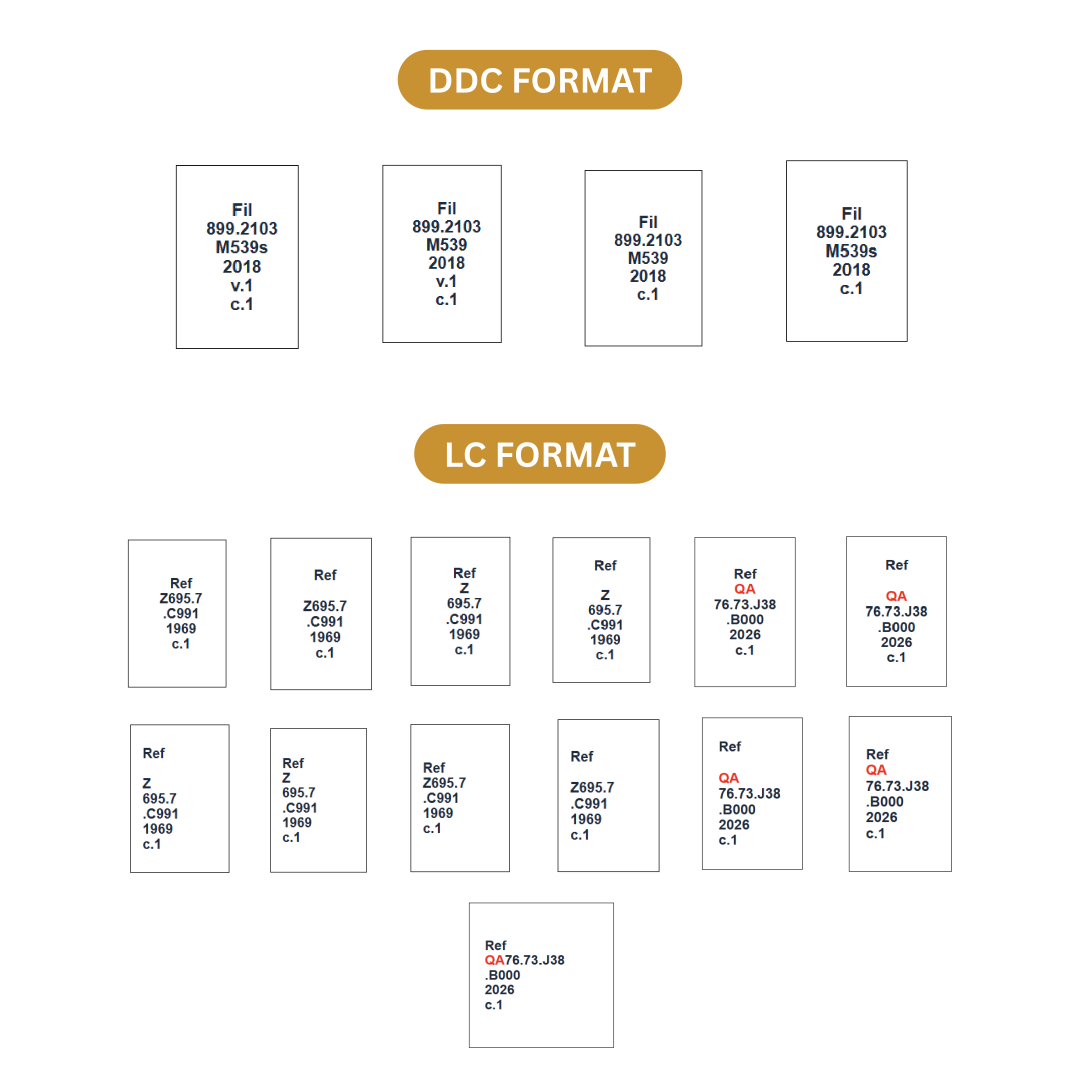
Sample formatted call number output
Cutter Generator
Automatically generates Cutter-Sanborn author numbers from author names and title workmarks.
Call Number Builder
Creates formatted call numbers using location code, class number, Cutter number, year, volume, and copy number.
Bulk Label Printing
Allows users to import CSV bibliographic data and generate printable spine labels in bulk.
LLE Exam Challenges
Provides subject-based practice questions covering management, reference, cataloging, acquisition, indexing, and information technology.
Cataloging Articles
Explains Cutter-Sanborn history, DDC and LCC selection, and the role of focused web tools in technical-services workflows.
FAQs and Guides
Offers in-page tutorials on DDC call numbers, Cutter and LCC questions, and clear, consistent spine-label preparation.
Practical Cataloging Guides
Explore 15 guides covering author numbers, classification, MARC, subject headings, record checks, and spine-label preparation. Browse the learning library.
From Cataloging Task to Continued Learning
Users can generate a single Cutter or formatted call number on the Home page, process up to 50 records through Bulk Labels, and then visit the Review Hub for deeper explanations and exam-focused study materials.
Articles and guides expand within the Review Hub, keeping the title, short description, full discussion, and APA-style references together without sending readers to a separate article page.
Darwin Besorio, RL
This application was created by Mr. Darwin Besorio, a Licensed Librarian and Web Developer who aims to contribute to the field of librarianship through digital innovation.
Through this project, he hopes to provide a practical and accessible tool that can assist libraries, librarians, catalogers, and library science students in improving cataloging workflows.
Cataloging Aid Notice
This application is intended as a cataloging aid. Generated Cutter numbers and call numbers should always be reviewed and verified according to local library policies, institutional standards, DDC, LCC, and other cataloging rules used by the library.
Purpose and cataloging focus
LibCatalogTools is an independent library technology project for librarians, library staff, students, and information professionals. Its focus is practical: author-number lookup, call-number assembly, readable spine labels, and explanations of the cataloging decisions around those tasks.
Who the tools are for
Cataloging staff can use the forms to reduce repeated lookup and formatting. Students can compare inputs, table matches, and label components to understand the workflow. Supervisors can use the learning examples to discuss where local policy and professional review are needed.
How the tools work
The site uses browser-based JavaScript and a bundled Cutter-Sanborn lookup file. Users supply classification and item details. The tool assembles those values; it does not consult a live authority file, classification subscription, or local library catalog. The Learn guides document those behaviors with examples and link to official references when discussing standards.
Developer background
The project was created by Darwin Besorio, RL, a licensed librarian and web developer, as described above. It brings library workflow needs and web development together in a focused toolkit.
Accuracy and limitations
Review output against the adopted classification scheme and local shelf arrangement. In particular, LC display mode retains the Cutter-Sanborn lookup and cannot establish an authoritative LC Cutter. Two-digit output truncates the bundled code, and title workmarks follow a limited English-article rule. The guides identify fictional teaching examples and distinguish suggested local procedures from standards.
Contact and corrections
Use the contact page to report a tool issue or suggest a correction. Include the page, input or example, observed result, expected result, and supporting cataloging reference where relevant. Read the scope and limitations for further context.